
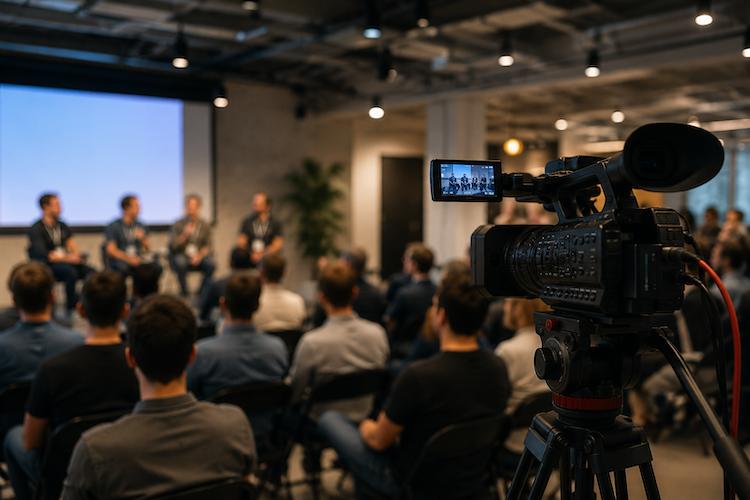
How to Film a Tech Meetup
Planning the agenda for a tech meetup is crucial to ensure a successful and engaging event. Here are some key steps to consider when organizing the schedule:
- Start by identifying the main topics or themes that you want to cover during the meetup. Consider what your audience is interested in and what will be most valuable to them.
- Once you have your topics in mind, start reaching out to potential speakers who can share their expertise on these subjects. Make sure to confirm their availability and discuss any specific requirements they may have for their presentation.
- Think about incorporating interactive activities into the agenda to keep attendees engaged and provide opportunities for networking. This could include Q&A sessions, workshops, or panel discussions.
- Consider the length of the meetup and how much time to allocate to each topic or activity. It’s important to strike a balance between covering the necessary content and allowing for breaks and socializing.
- Communicate the agenda clearly with all stakeholders, including speakers, sponsors, and attendees. Make sure everyone knows what to expect and what their role will be during the meetup.
- Stay flexible and be prepared to make adjustments to the agenda as needed. Sometimes things may not go as planned, so having a backup plan in place can help keep the event running smoothly.
By carefully planning the agenda for your tech meetup, you can create a structured and engaging experience for all participants. Remember to focus on the needs and interests of your audience to ensure that the topics and activities you choose will resonate with them.
Selecting the Perfect Venue for Your Tech Meetup
When planning to film a tech meetup, one of the most crucial steps is selecting the right venue. The venue you choose will impact the overall quality of your footage, so it’s essential to consider factors like lighting, acoustics, and seating arrangements.
Lighting: Opt for a venue with ample natural light or good artificial lighting. Bright, evenly distributed lighting will ensure that your footage is clear and visually appealing. Avoid venues with harsh lighting that could cast unwanted shadows on speakers or presenters.
Acoustics: Choose a venue with good acoustics to ensure that sound can be captured clearly. Avoid spaces with excessive echo or background noise, as this can distract from the content being shared at the meetup. If the venue has poor acoustics, consider using external microphones to improve sound quality.
Seating Arrangements: When filming a tech meetup, it’s essential to consider seating arrangements to ensure that all participants can see and hear the speakers clearly. Choose a venue with comfortable seating that allows for easy movement and engagement among attendees. Consider the layout of the space to determine the best placement for cameras and equipment.
- Tip: Visit potential venues ahead of time to assess their suitability for filming. Test the lighting and acoustics to ensure they meet your requirements.
By selecting a venue with the right lighting, acoustics, and seating arrangements, you can set yourself up for success when filming a tech meetup. Remember that the venue plays a significant role in the overall production quality of your footage, so choose wisely to ensure the best results.
Set up the necessary equipment for filming
Before you can start capturing all the exciting moments at your tech meetup, you need to make sure you have the right equipment in place. Here are the essential tools you’ll need:
- Cameras: Choose cameras that can record in high quality and have good focus capabilities. Position them strategically to cover all angles of the event.
- Microphones: Quality sound is just as important as good visuals. Invest in microphones that can pick up clear audio from speakers and audience members.
- Tripods: Keep your footage steady by using tripods to hold the cameras in place. This will prevent shaky shots and improve the overall production value.
- Lighting: Proper lighting is key to getting a professional-looking video. Make sure the venue is well-lit and consider bringing additional lighting equipment if needed.
Once you have all your equipment ready, it’s important to test everything before the tech meetup begins. Check that the cameras are working properly, the microphones are picking up sound effectively, and the lighting is flattering for the speakers. This pre-event testing will help you avoid any technical hiccups during the actual filming.
Remember, it’s not just about having the fanciest gear – ensuring that your equipment is set up correctly and functioning well is crucial for capturing the best possible footage of your tech meetup.
Test the audio and video equipment before the tech meetup begins to ensure everything is working properly
Before the tech meetup starts, it’s crucial to test all the audio and video equipment to avoid any technical glitches that could disrupt the filming process. Here are a few simple steps to follow:
- Check connections: Make sure all cables are securely connected to the cameras, microphones, tripods, and any other equipment being used for filming.
- Test microphones: Have speakers or team members speak into the microphones to check for clear sound. Adjust the volume levels if necessary to ensure everyone can be heard clearly.
- Double-check lighting: Test the lighting setup to ensure proper illumination for recording. Make adjustments as needed to avoid any shadows or glare that could affect the video quality.
- Test camera angles: Position the cameras in different locations to capture various angles and shots. Check the framing and focus of each camera to make sure everything is in view and clear.
- Run a test recording: Record a short test video to check for any issues with audio, video quality, or lighting. Review the footage to identify any areas that need improvement before the actual meetup begins.
By taking the time to test the audio and video equipment before the tech meetup starts, you can minimize the risk of technical difficulties during the event and ensure a seamless filming experience.
Position the cameras strategically to capture different angles and shots throughout the event
When filming a tech meetup, it’s important to position your cameras in a way that captures the event from multiple perspectives to create dynamic footage. Here are some tips on how to strategically place your cameras:
- Main Camera: The main camera should capture an overall view of the stage or presenter. This camera will be used to show full-body shots of speakers and activities.
- Side Cameras: Place side cameras at different angles to provide close-up shots of speakers and audience reactions. These cameras can also capture any visual aids or presentations being used.
- Crowd Camera: Position a camera to capture the audience’s perspective, showing their engagement and reactions to the presentations. This adds a layer of authenticity to the footage.
- Roving Camera: Have a handheld camera or operator wandering around to capture candid moments and interactions between attendees. This adds a personal touch to the video.
- Professional Cameras: Consider using higher quality cameras for keynote speakers or important moments during the meetup. These cameras can provide sharper images and better audio quality.
By strategically placing your cameras throughout the event, you can ensure that you capture all the key moments and create engaging footage that will keep viewers interested. Remember to test different angles and adjust camera positions as needed to get the best shot possible.
Coordinate with speakers and presenters for a successful tech meetup filming
One of the most important aspects of filming a tech meetup is ensuring that your speakers and presenters are comfortable with being on camera. Communication is key to making sure everyone is on the same page and that the filming process runs smoothly.
- Get in touch: Reach out to your speakers and presenters ahead of time to let them know that the event will be filmed. This gives them an opportunity to ask any questions or raise any concerns they may have.
- Provide guidance: Some people may feel nervous about speaking in front of a camera, so offering guidance on how to communicate effectively on camera can help put them at ease. Encourage them to speak clearly, make eye contact with the camera, and engage with the audience.
- Address any concerns: If any of your speakers or presenters are uncomfortable with being filmed, talk to them about their concerns and see if there are ways to accommodate their needs. It’s important to respect their wishes while still capturing valuable content for your viewers.
Remember, the goal is to create a welcoming and inclusive environment for your speakers and presenters so that they can deliver their message effectively. By coordinating with them and providing guidance as needed, you can ensure a successful filming experience for everyone involved.
Prepare Visual Aids and Presentations
Visual aids and presentations can significantly enhance the overall experience of a tech meetup for both attendees and viewers of the filmed footage. To ensure they are effective and compatible with the filming setup, follow these simple steps:
- Choose the Right Format: When preparing visual aids and presentations, consider the format that works best for both in-person and filmed viewing. Utilize slideshows, charts, diagrams, or videos that can easily be captured on camera and viewed clearly by the audience.
- Optimize for Viewing: Check that your visual aids and presentations are easily visible and readable from different angles in the venue. Font size, color contrast, and design layout are important factors to consider to ensure clarity for both live audience members and viewers watching the footage later on.
- Test Compatibility: Before the tech meetup begins, make sure to test your visual aids and presentations on the actual equipment that will be used for filming. Check that any digital files, slides, or videos are compatible with the devices and software being deployed to avoid any technical issues during the event.
- Ensure Accessibility: Consider the accessibility of your visual aids and presentations for all attendees and viewers, including those with hearing or visual impairments. Provide alternatives such as transcript text, captions, or descriptions for any audiovisual content to ensure inclusivity and engagement for all participants.
- Coordinate with Speakers: Collaborate with speakers and presenters to integrate their content seamlessly into the visual aids and presentations. Provide guidelines for incorporating visuals into their presentations and ensure that any multimedia elements align with the overall theme and agenda of the tech meetup.
By preparing and optimizing your visual aids and presentations in advance, you can enhance the quality of your tech meetup filming and provide valuable content for both onsite attendees and a broader online audience. Remember to adapt and refine your visual materials based on feedback and lessons learned from previous events to continually improve the effectiveness of your filmed tech meetups.
Designated Camera Team Member
Having a designated team member to monitor and adjust the cameras during the event is crucial for ensuring a smooth filming process. This person plays a key role in capturing the tech meetup effectively and seamlessly transitioning between speakers and activities.
Throughout the event, the camera operator should be actively monitoring the camera angles and shots to ensure they are capturing all the important moments. This includes adjusting the focus, zoom, and framing to get the best possible footage. Communication with the rest of the team, especially the director or producer, is important to stay on the same page regarding which shots to prioritize.
In addition to monitoring the cameras, the team member should also be prepared to troubleshoot any technical issues that may arise. This could include adjusting the lighting, audio levels, or camera settings to optimize the quality of the footage. Being proactive in addressing any potential problems can prevent delays and ensure that the filming goes smoothly.
During transitions between speakers and activities, the camera team member plays a critical role in maintaining the flow of the event. They need to anticipate when to switch between different cameras, adjust the framing for each speaker, and ensure that the recordings are synchronized to capture all the important moments.
Finally, it’s essential for this team member to be attentive to the overall atmosphere of the event and how the audience is engaging with the content. By capturing audience reactions and interactions, they can add depth to the final footage and create a more engaging viewing experience for viewers.
Overall, having a designated team member to monitor and adjust the cameras ensures that the filming process runs smoothly and captures all the important moments of the tech meetup. Their attention to detail, technical expertise, and ability to adapt to changing circumstances are essential for creating high-quality video content that effectively showcases the event.
Capture Audience Interactions and Engagement
One of the most important aspects of filming a tech meetup is capturing the audience interactions and engagement. These moments bring life to your video and show the real-time responses to the topics discussed.
- Stay Alert: As the person behind the camera, it’s crucial to stay alert and keep an eye out for interesting audience reactions. This could be laughter, nods of agreement, or even questions asked during Q&A sessions.
- Engage with the Audience: Encourage the audience to participate actively by asking for their feedback or thoughts on the topics being discussed. This not only adds depth to your footage but also creates a more interactive experience for viewers watching the video later on.
- Follow the Energy: Pay attention to the energy in the room and focus on capturing moments where the audience is most engaged. This could be during a lively discussion, a hands-on demonstration, or a networking break where people are exchanging ideas.
- Vary Your Shots: Experiment with different angles and shots to capture audience interactions from various perspectives. Close-up shots can convey emotions and reactions more effectively, while wide shots can give a sense of the overall atmosphere in the room.
- Include Testimonials: If attendees are willing, ask them to share their thoughts on camera after the event. These testimonials can be powerful additions to your video, providing firsthand insights into the impact of the tech meetup.
Remember, audience interactions are what make a tech meetup memorable and meaningful. By capturing these moments on camera, you not only add depth to your video but also create a more engaging viewing experience for those who couldn’t attend the event in person.
So, keep your focus on the audience, listen to their reactions, and be ready to capture those spontaneous and authentic moments that will bring your tech meetup video to life.
Respecting Participants’ Privacy
When you’re filming a tech meetup, it’s essential to remember that not everyone may be comfortable being on camera. Some attendees might prefer to stay behind the scenes or simply not want their faces shown to a wider audience. As a filmmaker, it’s crucial to respect their privacy and make sure they feel comfortable throughout the event.
- Ask for Consent: Before the tech meetup begins, it’s a good idea to inform participants that the event will be filmed for documentation purposes. Encourage them to approach you if they have any concerns about being on camera. Always ask for explicit consent before capturing any close-up shots of individuals.
- Avoid Intrusive Filming: While it’s important to capture the energy and dynamics of the event, be mindful of how you frame your shots. Avoid zeroing in on people who may not want to be on camera, and opt for wide-angle shots that focus more on the overall atmosphere rather than individual faces.
- Respect Personal Space: People attend tech meetups to network, learn, and engage with like-minded individuals. Be mindful of personal boundaries and avoid filming people in private conversations or intimate moments without their permission.
- Offer Alternatives: If someone expresses discomfort about being on camera, offer alternatives such as positioning them in a part of the venue that is not in the direct line of sight of the cameras. Make sure to communicate openly and respectfully to find a solution that works for everyone.
By being aware of participants’ preferences and respecting their privacy, you not only create a more inclusive and welcoming environment at the tech meetup but also maintain trust and professionalism as a filmmaker. Remember, it’s all about striking a balance between capturing the essence of the event and ensuring the comfort and consent of all attendees.
Editing the Footage
Once the tech meetup is over and all the footage has been captured, it’s time to start the editing process. Editing is where the magic happens, turning hours of raw footage into a polished and coherent final product.
- Review and Organize: Start by reviewing all the footage you have collected. Organize it into different sections based on the agenda and topics discussed during the meetup. This will make it easier to piece together a cohesive narrative later on.
- Remove Unwanted Content: Not everything that was recorded will be essential for the final video. Remove any outtakes, technical issues, or dull moments to keep the content engaging and focused.
- Create a Storyline: Use the edited footage to create a storyline that flows smoothly from one topic to the next. Highlight key moments, insights, and interactions that capture the essence of the tech meetup.
- Add B-Roll and Visual Enhancements: To make the video visually appealing, consider adding B-roll footage, graphics, animations, and visual effects. These elements can help break up the monotony of talking-head shots and keep viewers engaged.
- Enhance Audio and Visuals: Adjust the audio levels to ensure clear sound quality throughout the video. Color correct and enhance the visuals to make sure the footage looks professional and consistent.
- Add Transitions and Titles: Smooth transitions between different segments of the video can help maintain a seamless flow. Adding titles and subtitles can also provide context and guidance to viewers.
- Include Audience Reactions: If possible, incorporate audience reactions and interactions into the final edit. This adds a human touch to the video and showcases the engagement and energy of the event.
Editing can be a time-consuming process, but it is crucial for creating a high-quality video that captures the essence of the tech meetup. Take your time to fine-tune the footage, ensuring that the final product effectively communicates the key moments and insights shared during the event.
Consider adding captions or subtitles for wider accessibility
Adding captions or subtitles to your video can greatly enhance its accessibility and reach a wider audience. Not only do they make your content accessible to those who are deaf or hard of hearing, but they also benefit non-native speakers, viewers in noisy environments, and those with cognitive disabilities.
- Subtitles for clear communication: Subtitles provide a written text of the spoken dialogue in the video, allowing viewers to follow along even if they cannot hear the audio. This is particularly important for tech meetups where complex technical terms and concepts are discussed.
- Captions for added context: Captions not only transcribe the spoken words but also include descriptions of other audio elements, like sound effects or background music. This extra layer of information can enrich the viewing experience for all audiences.
When adding captions or subtitles to your video, it’s important to ensure they are accurate, synchronized with the audio, and easy to read. This can be done using various video editing software or online tools that specialize in creating subtitles.
Captions and subtitles can also be used strategically on social media platforms to grab the attention of scrolling users. Many viewers watch videos with the sound off, so having captions can keep them engaged and help convey your message effectively.
Remember to consider the design and placement of captions or subtitles in your video. Make sure they are readable and don’t obstruct any important visual elements. You can also use different colors or fonts to differentiate speakers or emphasize key points.
By including captions or subtitles in your tech meetup video, you are not only making it more inclusive but also improving its overall quality and appeal. Take the time to carefully craft and refine your captions to ensure they enhance the viewing experience for all audiences.
More

Case : Event photography for Palisades Village
Palisades Village is a premier outdoor shopping and lifestyle destination in Pacific Palisades, California. Capturing events at such an iconic venue requires a blend of candid storytelling, detailed commercial shots, and high-energy atmosphere photography. Below is a breakdown of how we captured the essence and vibrant energy of this event. Every great event begins with […]
More
Case : Peony Field Photoshoot at Bury Lane Farm | Cambridge Photographer
This beautiful group portrait photography session took place in the breathtaking peony fields of Bury Lane Farm in Cambridgeshire. As a Cambridge photographer specialising in portrait photography and lifestyle photography, I love creating natural images that capture genuine emotions and meaningful moments. Nine wonderful women came together to enjoy an unforgettable summer afternoon surrounded by […]
More
Case : Professional Headshot Photography in West Hollywood
I delivered personalized headshot photography sessions in West Hollywood for professionals seeking high-impact images for articles, corporate profiles, and social media. Client: Professionals and musicians looking to elevate their personal branding with compelling portraits. Objective: To create confident, authentic images that help clients make a memorable first impression. Process: 1. Consultation Discussed each client’s style […]
More